> ## Documentation Index
> Fetch the complete documentation index at: https://ngquct-refactor-theme-engine-v2.mintlify.site/llms.txt
> Use this file to discover all available pages before exploring further.
# Table Structure
> Browse and edit columns, indexes, foreign keys, triggers, and DDL with a visual structure editor
This is a DDL editor with a grid in front of it. Rename a column, add an index, change a key, and what you get is a pending `ALTER TABLE` you can read before it runs; the table on the server is untouched until you apply it.
 Open a table and switch the result view to **Structure**, or right-click it in the sidebar and choose **Show Structure**.
The tabs are **Columns**, **Indexes**, **Foreign Keys**, **Constraints**, **Triggers**, **DDL**, and **Parts** (ClickHouse only); the first five carry item counts. A tab the engine has no concept of is hidden: ClickHouse has no Foreign Keys, Redshift no Triggers, Redis no Constraints. Every grid has a filter field, and clicking a header sorts.
## Columns tab
Columns are edited in place. **Nullable**, **Primary Key**, and **Auto Inc** are YES/NO dropdowns; **Primary Key** set to YES forces **Nullable** to NO and holds it there until the key comes back off. **Type** opens a picker of the engine's types by category: search to filter, or type a parametric value such as `VARCHAR(255)` and press Return to use it as written. On PostgreSQL and PGlite the picker opens with a **User-Defined** group of the database's enums, composites, domains and ranges, each listed schema-qualified as `sales.status`. See [User-Defined Types](/features/user-defined-types).
Which remaining columns appear is the driver's choice. **Comment** is there on most engines and writes the column comment. MySQL and MariaDB add **Charset**, **Collation**, and **On Update**; **On Update** set to YES on a `TIMESTAMP` or `DATETIME` column adds `ON UPDATE CURRENT_TIMESTAMP` at that column's own precision, so `TIMESTAMP(6)` gets `ON UPDATE CURRENT_TIMESTAMP(6)`.
### Default
The cell holds the SQL that follows `DEFAULT`, so a string literal carries its own quotes and an expression is written the way the engine spells it. Click the chevron for the engine's own list.
| Item | What the column gets |
| ---------------- | ---------------------------------------------------------------------------------------------------------------------------------------------------------------------------------------------------------------------------------------- |
| **No default** | No `DEFAULT` clause at all |
| **NULL** | `DEFAULT NULL` |
| **Empty string** | `DEFAULT ''`. Absent on Oracle and Dameng, where a zero-length string is already null |
| **Expressions** | The engine's own: `CURRENT_TIMESTAMP` and `(UUID())` on MySQL, `now()` and `gen_random_uuid()` on PostgreSQL, `GETDATE()` and `NEWID()` on SQL Server, `SYSTIMESTAMP` on Oracle, `now64(3)` on ClickHouse, `(datetime('now'))` on SQLite |
| **Custom…** | Whatever the list has no entry for, entered as **Text** or as a **SQL expression** |
Typing straight into the cell is the same as **SQL expression**, so `pending` is a column reference and `'pending'` is the string. **Text** does the quoting and escaping for you.
Auto-increment has its own **Auto Inc** field.
Open a table and switch the result view to **Structure**, or right-click it in the sidebar and choose **Show Structure**.
The tabs are **Columns**, **Indexes**, **Foreign Keys**, **Constraints**, **Triggers**, **DDL**, and **Parts** (ClickHouse only); the first five carry item counts. A tab the engine has no concept of is hidden: ClickHouse has no Foreign Keys, Redshift no Triggers, Redis no Constraints. Every grid has a filter field, and clicking a header sorts.
## Columns tab
Columns are edited in place. **Nullable**, **Primary Key**, and **Auto Inc** are YES/NO dropdowns; **Primary Key** set to YES forces **Nullable** to NO and holds it there until the key comes back off. **Type** opens a picker of the engine's types by category: search to filter, or type a parametric value such as `VARCHAR(255)` and press Return to use it as written. On PostgreSQL and PGlite the picker opens with a **User-Defined** group of the database's enums, composites, domains and ranges, each listed schema-qualified as `sales.status`. See [User-Defined Types](/features/user-defined-types).
Which remaining columns appear is the driver's choice. **Comment** is there on most engines and writes the column comment. MySQL and MariaDB add **Charset**, **Collation**, and **On Update**; **On Update** set to YES on a `TIMESTAMP` or `DATETIME` column adds `ON UPDATE CURRENT_TIMESTAMP` at that column's own precision, so `TIMESTAMP(6)` gets `ON UPDATE CURRENT_TIMESTAMP(6)`.
### Default
The cell holds the SQL that follows `DEFAULT`, so a string literal carries its own quotes and an expression is written the way the engine spells it. Click the chevron for the engine's own list.
| Item | What the column gets |
| ---------------- | ---------------------------------------------------------------------------------------------------------------------------------------------------------------------------------------------------------------------------------------- |
| **No default** | No `DEFAULT` clause at all |
| **NULL** | `DEFAULT NULL` |
| **Empty string** | `DEFAULT ''`. Absent on Oracle and Dameng, where a zero-length string is already null |
| **Expressions** | The engine's own: `CURRENT_TIMESTAMP` and `(UUID())` on MySQL, `now()` and `gen_random_uuid()` on PostgreSQL, `GETDATE()` and `NEWID()` on SQL Server, `SYSTIMESTAMP` on Oracle, `now64(3)` on ClickHouse, `(datetime('now'))` on SQLite |
| **Custom…** | Whatever the list has no entry for, entered as **Text** or as a **SQL expression** |
Typing straight into the cell is the same as **SQL expression**, so `pending` is a column reference and `'pending'` is the string. **Text** does the quoting and escaping for you.
Auto-increment has its own **Auto Inc** field.

 Changing the default of a column that already exists takes a different route per engine. Most run `ALTER TABLE … SET DEFAULT`. SQLite, libSQL and Cloudflare D1 have no such statement, so the change is made by recreating the table, reviewed first like any other rebuild. Snowflake can only remove a default, and saving one there is refused with **Unsupported schema operation**.
### Generated columns
PostgreSQL, CockroachDB, PGlite, MySQL, MariaDB and SQLite add two more fields. **Generated** is a menu of Not generated, STORED and VIRTUAL; **Expression** holds the SQL the value is computed from. Set both on a new row and the column is created as `GENERATED ALWAYS AS (expression)`. PostgreSQL 11 and earlier have no generated columns, so on those servers neither field appears.
The keyword is always written out. PostgreSQL 17 and earlier accept STORED only, PostgreSQL 18 made VIRTUAL the default, and MySQL and MariaDB default to VIRTUAL, so leaving it implicit would mean different columns on different servers.
Changing the default of a column that already exists takes a different route per engine. Most run `ALTER TABLE … SET DEFAULT`. SQLite, libSQL and Cloudflare D1 have no such statement, so the change is made by recreating the table, reviewed first like any other rebuild. Snowflake can only remove a default, and saving one there is refused with **Unsupported schema operation**.
### Generated columns
PostgreSQL, CockroachDB, PGlite, MySQL, MariaDB and SQLite add two more fields. **Generated** is a menu of Not generated, STORED and VIRTUAL; **Expression** holds the SQL the value is computed from. Set both on a new row and the column is created as `GENERATED ALWAYS AS (expression)`. PostgreSQL 11 and earlier have no generated columns, so on those servers neither field appears.
The keyword is always written out. PostgreSQL 17 and earlier accept STORED only, PostgreSQL 18 made VIRTUAL the default, and MySQL and MariaDB default to VIRTUAL, so leaving it implicit would mean different columns on different servers.
 Two limits apply to a column that already exists. Switching **Generated** on it is refused by every engine: drop the column and add it back to make it generated, which discards its data. On SQLite, a column added to a populated table is VIRTUAL; `ALTER TABLE` refuses `cannot add a STORED column` there, so STORED is reachable only when the table is created.
 Add a column with **+** at the right of the status bar or `Cmd+Shift+N`. Select rows and click **-** or press `Delete` to mark them for removal.
Flag **Primary Key** on one column, or several for a composite key in one `PRIMARY KEY (col1, col2)` clause. On an existing table that becomes a drop of the old constraint followed by an add.
Drag a column row to reorder it, or right-click one and choose **Move Column Up** or **Move Column Down**. Both are dimmed with the reason spelled out under them while unsaved changes exist, while the list is filtered or sorted, on a view, and on an engine that cannot change column order.
What the drag does depends on the engine:
| Engine | What happens |
| ----------------------------------------------- | --------------------------------------------------------------------------------------------------------------------------------------------------------------------------------------------------- |
| MySQL, MariaDB, ClickHouse | Runs `ALTER TABLE … MODIFY COLUMN … FIRST \| AFTER` straight away. No rows are read or written |
| Oracle | Runs a pair of `MODIFY (col INVISIBLE)` and `MODIFY (col VISIBLE)` statements per column that has to move, which appends it to the end of the order. Needs Oracle 12.1. No rows are read or written |
| SQLite, local-file libSQL | Shows the rebuild script, and runs it when you confirm. The table is recreated in the wanted order, the rows are copied, and the indexes and triggers are put back |
| PostgreSQL, Turso, remote libSQL, Cloudflare D1 | Shows the rebuild script for you to read and run. TablePro does not run it: the script ends in `DROP TABLE`, and what it cannot carry over is listed above it |
Everything that runs goes to query history rather than the change queue.
## Indexes tab
| Field | Description |
| ------------- | ---------------------------------------------------------------------------------------------------------------------- |
| **Columns** | Indexed columns. Multi-column indexes list several columns in one row. MySQL prefix lengths are written as `email(20)` |
| **Type** | BTREE, HASH, FULLTEXT, SPATIAL (MySQL), GIN, GIST, BRIN (PostgreSQL 9.5 and later) |
| **Unique** | Whether the index enforces uniqueness |
| **Condition** | `WHERE` predicate for partial indexes (PostgreSQL, SQLite, libSQL, Cloudflare D1) |
## Foreign keys tab
| Field | Description |
| --------------------------- | ----------------------------------------------------------------------------- |
| **Columns** | Local column(s) |
| **Ref Table / Ref Columns** | Referenced table and column(s), chosen from the database's own names or typed |
| **Ref Schema** | Referenced schema, for cross-schema references |
| **On Delete / On Update** | Dropdowns listing only the actions the engine takes |
Right-click a foreign key and choose **Open \[table]** to jump to the referenced table. Right-click any row in these three grids for **Copy** (the cell under the pointer), **Copy Name**, **Copy Definition**, **Copy As** (CSV, JSON, SQL), **Duplicate**, and **Delete** (`Delete`). A row already marked for deletion offers **Undo Delete**. The same menu appears whether or not the row was already selected, and its row commands act on the whole selection.
**Add Foreign Key** and **Remove Foreign Key** sit under the list. Both are dimmed on a view and on an engine that cannot edit foreign keys, with the reason in the tooltip.
What the save does depends on the engine:
| Engine | What happens |
| ---------------------------------------------------------------------- | ----------------------------------------------------------------------------------------------------------------------------------------------------------------------------------------------------------------------------------------------------------------------- |
| MySQL, MariaDB, PostgreSQL, PGlite, SQL Server, Oracle, DuckDB, Dameng | Runs `ALTER TABLE … ADD CONSTRAINT` and `DROP CONSTRAINT` alongside the rest of the save |
| SQLite, local-file libSQL | Shows the rebuild script, and runs it when you confirm. No SQLite version can add or drop a foreign key with `ALTER TABLE`, so the table is recreated carrying the keys you asked for, the rows are copied with their rowids, and the indexes and triggers are put back |
| Turso, remote libSQL, Cloudflare D1 | Shows the rebuild script for you to read and run. TablePro does not run it: each statement is its own HTTP request, so nothing can hold the rebuild in one transaction |
A rebuild carries everything else staged in the same save, and ends in `PRAGMA foreign_key_check` scoped to the table. Rows that do not match the new key roll the whole rebuild back, and the count comes back in the error.
A column renamed or dropped in the same save runs as its own `ALTER TABLE` after the rebuild, so the new name reaches every index, trigger and view. A drop that would leave one of those naming a column that is gone fails the whole save rather than committing it broken.
## Constraints tab
Check constraints are table-level, so a rule spanning two columns is one row here rather than something hidden on a column.
| Field | Description |
| -------------- | -------------------------------------------- |
| **Name** | Constraint name, used to drop or rename it |
| **Expression** | The condition every row must satisfy |
| **Columns** | Columns the expression references, read-only |
Add a column with **+** at the right of the status bar or `Cmd+Shift+N`. Select rows and click **-** or press `Delete` to mark them for removal.
Flag **Primary Key** on one column, or several for a composite key in one `PRIMARY KEY (col1, col2)` clause. On an existing table that becomes a drop of the old constraint followed by an add.
Drag a column row to reorder it, or right-click one and choose **Move Column Up** or **Move Column Down**. Both are dimmed with the reason spelled out under them while unsaved changes exist, while the list is filtered or sorted, on a view, and on an engine that cannot change column order.
What the drag does depends on the engine:
| Engine | What happens |
| ----------------------------------------------- | --------------------------------------------------------------------------------------------------------------------------------------------------------------------------------------------------- |
| MySQL, MariaDB, ClickHouse | Runs `ALTER TABLE … MODIFY COLUMN … FIRST \| AFTER` straight away. No rows are read or written |
| Oracle | Runs a pair of `MODIFY (col INVISIBLE)` and `MODIFY (col VISIBLE)` statements per column that has to move, which appends it to the end of the order. Needs Oracle 12.1. No rows are read or written |
| SQLite, local-file libSQL | Shows the rebuild script, and runs it when you confirm. The table is recreated in the wanted order, the rows are copied, and the indexes and triggers are put back |
| PostgreSQL, Turso, remote libSQL, Cloudflare D1 | Shows the rebuild script for you to read and run. TablePro does not run it: the script ends in `DROP TABLE`, and what it cannot carry over is listed above it |
Everything that runs goes to query history rather than the change queue.
## Indexes tab
| Field | Description |
| ------------- | ---------------------------------------------------------------------------------------------------------------------- |
| **Columns** | Indexed columns. Multi-column indexes list several columns in one row. MySQL prefix lengths are written as `email(20)` |
| **Type** | BTREE, HASH, FULLTEXT, SPATIAL (MySQL), GIN, GIST, BRIN (PostgreSQL 9.5 and later) |
| **Unique** | Whether the index enforces uniqueness |
| **Condition** | `WHERE` predicate for partial indexes (PostgreSQL, SQLite, libSQL, Cloudflare D1) |
## Foreign keys tab
| Field | Description |
| --------------------------- | ----------------------------------------------------------------------------- |
| **Columns** | Local column(s) |
| **Ref Table / Ref Columns** | Referenced table and column(s), chosen from the database's own names or typed |
| **Ref Schema** | Referenced schema, for cross-schema references |
| **On Delete / On Update** | Dropdowns listing only the actions the engine takes |
Right-click a foreign key and choose **Open \[table]** to jump to the referenced table. Right-click any row in these three grids for **Copy** (the cell under the pointer), **Copy Name**, **Copy Definition**, **Copy As** (CSV, JSON, SQL), **Duplicate**, and **Delete** (`Delete`). A row already marked for deletion offers **Undo Delete**. The same menu appears whether or not the row was already selected, and its row commands act on the whole selection.
**Add Foreign Key** and **Remove Foreign Key** sit under the list. Both are dimmed on a view and on an engine that cannot edit foreign keys, with the reason in the tooltip.
What the save does depends on the engine:
| Engine | What happens |
| ---------------------------------------------------------------------- | ----------------------------------------------------------------------------------------------------------------------------------------------------------------------------------------------------------------------------------------------------------------------- |
| MySQL, MariaDB, PostgreSQL, PGlite, SQL Server, Oracle, DuckDB, Dameng | Runs `ALTER TABLE … ADD CONSTRAINT` and `DROP CONSTRAINT` alongside the rest of the save |
| SQLite, local-file libSQL | Shows the rebuild script, and runs it when you confirm. No SQLite version can add or drop a foreign key with `ALTER TABLE`, so the table is recreated carrying the keys you asked for, the rows are copied with their rowids, and the indexes and triggers are put back |
| Turso, remote libSQL, Cloudflare D1 | Shows the rebuild script for you to read and run. TablePro does not run it: each statement is its own HTTP request, so nothing can hold the rebuild in one transaction |
A rebuild carries everything else staged in the same save, and ends in `PRAGMA foreign_key_check` scoped to the table. Rows that do not match the new key roll the whole rebuild back, and the count comes back in the error.
A column renamed or dropped in the same save runs as its own `ALTER TABLE` after the rebuild, so the new name reaches every index, trigger and view. A drop that would leave one of those naming a column that is gone fails the whole save rather than committing it broken.
## Constraints tab
Check constraints are table-level, so a rule spanning two columns is one row here rather than something hidden on a column.
| Field | Description |
| -------------- | -------------------------------------------- |
| **Name** | Constraint name, used to drop or rename it |
| **Expression** | The condition every row must satisfy |
| **Columns** | Columns the expression references, read-only |
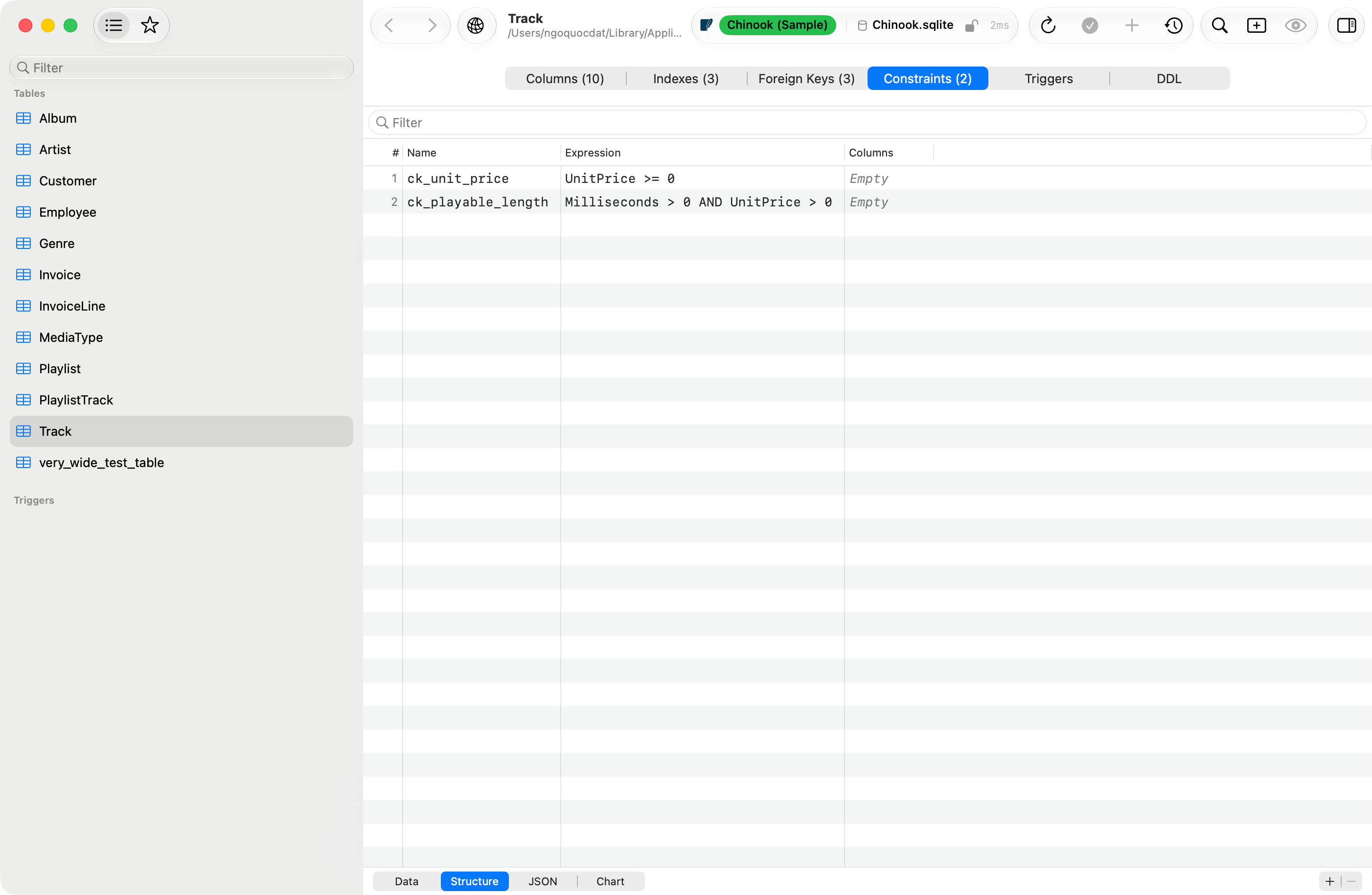
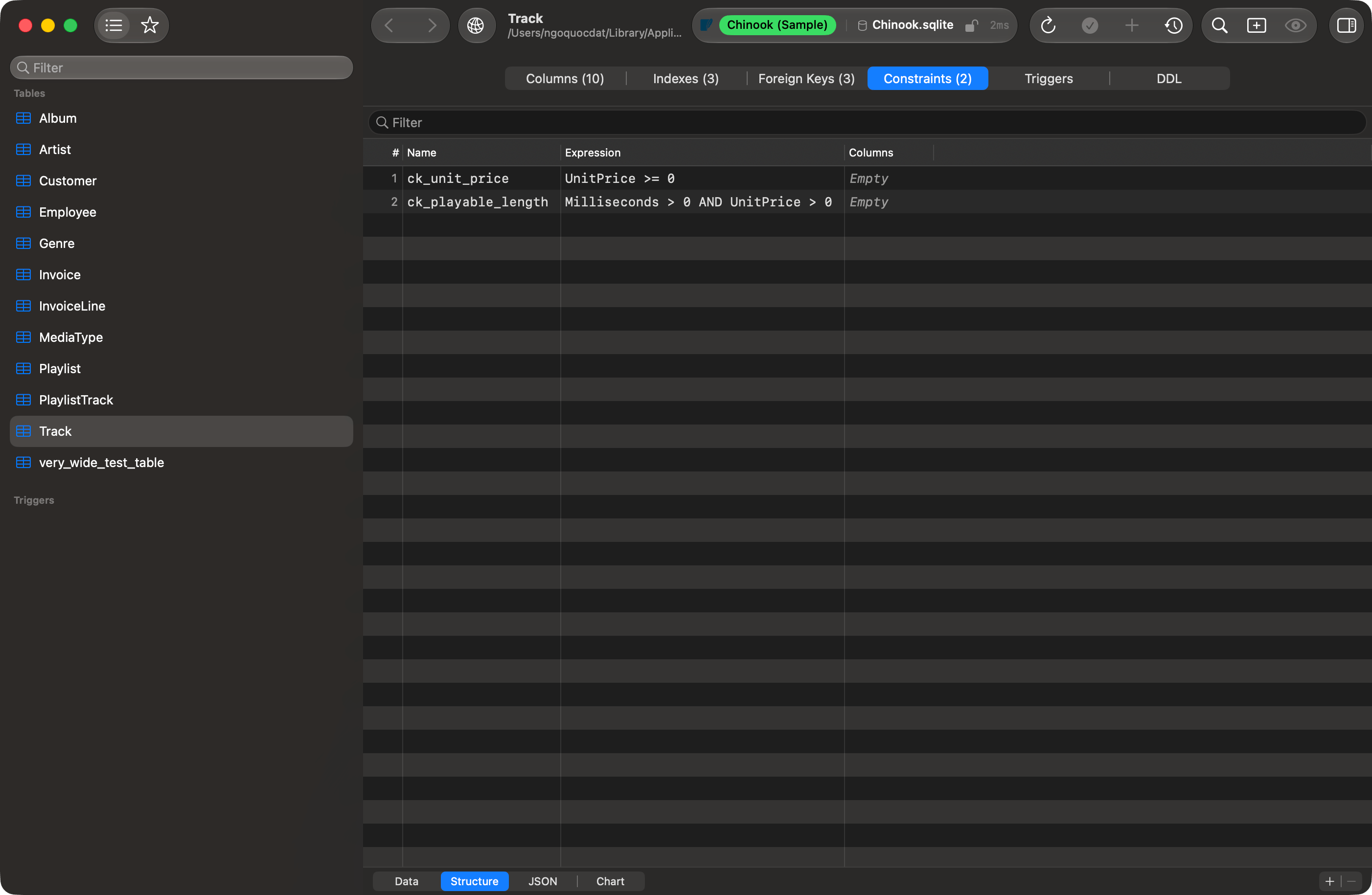 **Columns** is filled from the catalog on PostgreSQL and SQL Server. MySQL, MariaDB and SQLite publish no such catalog, so the cell stays empty there.
Renaming a constraint runs a single `RENAME CONSTRAINT` where the engine has one. Changing the expression drops and re-adds it, because no engine can alter a check in place. Both the re-add and a brand-new constraint scan every existing row and fail if any row violates the rule, so a failed save means the data disagrees with the constraint.
The tab is hidden on engines with no check constraints. SQL Server lists and edits them, but has computed columns rather than generated ones, so it gets this tab and not the two column fields.
SQLite is the one engine where listing and editing part company. The tab appears on every version, but **+** and **-** need SQLite 3.53.0 or later, the release that added `ADD CONSTRAINT` and `DROP CONSTRAINT` to `ALTER TABLE`. The driver links the system SQLite, so the version is the one macOS ships. On an older one the constraints still list, read-only.
## Saving changes
[Change Tracking](/features/change-tracking) covers the queue, undo (`Cmd+Z`) and redo (`Cmd+Shift+Z`). A save runs on the tab's own connection, database, and schema, the ones it was opened on, and never moves the sidebar or the toolbar.
* **Save Changes** (`Cmd+S` or the toolbar checkmark) applies the queue. Changes that can lose data, dropping a column, changing a type, adding NOT NULL, changing the primary key, first show a confirmation listing each one.
* **Preview SQL** (`Cmd+Shift+P`) shows the generated statements without executing them.
The queue outlives everything short of an explicit discard: closing the tab, closing the window, quitting, and **Refresh** all ask first. A save that never reaches the server leaves the tab open with its queue intact.
**Columns** is filled from the catalog on PostgreSQL and SQL Server. MySQL, MariaDB and SQLite publish no such catalog, so the cell stays empty there.
Renaming a constraint runs a single `RENAME CONSTRAINT` where the engine has one. Changing the expression drops and re-adds it, because no engine can alter a check in place. Both the re-add and a brand-new constraint scan every existing row and fail if any row violates the rule, so a failed save means the data disagrees with the constraint.
The tab is hidden on engines with no check constraints. SQL Server lists and edits them, but has computed columns rather than generated ones, so it gets this tab and not the two column fields.
SQLite is the one engine where listing and editing part company. The tab appears on every version, but **+** and **-** need SQLite 3.53.0 or later, the release that added `ADD CONSTRAINT` and `DROP CONSTRAINT` to `ALTER TABLE`. The driver links the system SQLite, so the version is the one macOS ships. On an older one the constraints still list, read-only.
## Saving changes
[Change Tracking](/features/change-tracking) covers the queue, undo (`Cmd+Z`) and redo (`Cmd+Shift+Z`). A save runs on the tab's own connection, database, and schema, the ones it was opened on, and never moves the sidebar or the toolbar.
* **Save Changes** (`Cmd+S` or the toolbar checkmark) applies the queue. Changes that can lose data, dropping a column, changing a type, adding NOT NULL, changing the primary key, first show a confirmation listing each one.
* **Preview SQL** (`Cmd+Shift+P`) shows the generated statements without executing them.
The queue outlives everything short of an explicit discard: closing the tab, closing the window, quitting, and **Refresh** all ask first. A save that never reaches the server leaves the tab open with its queue intact.
 A save runs on a connection of its own, so it never joins a transaction you have left open in a query tab.
### When one statement fails
A save is often several statements, run in order. Engines with transactional DDL roll the whole set back; MySQL, MariaDB, and Oracle commit each one as it runs, so everything before the failure has landed while the queue still holds all of it. An **Error Applying Changes** sheet reports what the server said: refresh before saving again, or the second save replays work the server already did.
## Triggers tab
Lists **Name**, **Timing** (BEFORE, AFTER, INSTEAD OF), **Event** (INSERT, UPDATE, DELETE), and **Enabled** where the engine reports it. Select one to read its `CREATE TRIGGER` statement from the catalog, with **Copy** and **Open in Editor**. **New Trigger**, **Edit**, and **Delete** sit in the action bar; the editor opens the trigger's real DDL, including the trigger function on PostgreSQL. Trigger changes run on their own connection, like a structure save.
Triggers are available for MySQL, MariaDB, PostgreSQL, SQLite, SQL Server, Oracle, libSQL, and Cloudflare D1; the tab is hidden elsewhere. Oracle does not return the trigger body, so the viewer and the editor start from the trigger header alone.
## DDL tab
Read-only `CREATE TABLE` with syntax highlighting and font size controls. **Copy**, **Export** as a `.sql` file, and **Open in Editor** send it onward. On PostgreSQL the `CREATE SEQUENCE` and `CREATE TYPE … AS ENUM` statements the table depends on are prepended, so the script runs on an empty database.
Open the tab on a view and it carries that view's own `CREATE VIEW` or `CREATE MATERIALIZED VIEW` instead, the same statement **Show DDL** opens. A materialized view's indexes follow it.
## Parts tab (ClickHouse)
Lists partitions and parts from `system.parts`. **Optimize** merges parts; **Drop Partition** and **Detach Partition** act on the selected partition. Detached data stays on disk and is unreadable until it is re-attached.
## Creating a new table
Choose **Database > New Table…**, or right-click empty space in the sidebar and choose **New Table…**. The tab holds a **Table Name** field (with Engine, Charset, and Collation pickers on MySQL and MariaDB), the same three editing grids, and a **SQL Preview** tab carrying the live `CREATE TABLE`. **Create Table** (`Cmd+Enter` or `Cmd+S`) executes it and opens the new table.
On the **Foreign Keys** grid, **Columns**, **Ref Table**, and **Ref Columns** open menus of the new table's own columns, the database's tables, and the referenced table's columns. Each menu ends in **Custom…** for a name the list does not carry, and picking a second entry in a comma-separated cell appends to it.
**Name** is optional on a foreign key. Left blank, no `CONSTRAINT` clause is written and the engine names the constraint itself.
A row that is started and unfinished is never dropped from the generated SQL. **Create Table** dims and the reason sits beside it, naming the grid and the row: a foreign key with no referenced table, an index with no name, two columns sharing a name. Delete the row or finish it.
Indexes run as their own `CREATE INDEX` statements after the table, in one transaction where the engine has transactional DDL.
Visual table creation is supported for MySQL, MariaDB, PostgreSQL, PGlite, SQLite, SQL Server, ClickHouse, DuckDB, Oracle, Snowflake, libSQL, Cloudflare D1, Trino, Teradata, and Dameng.
## MongoDB collections
MongoDB structure is read-only, and inferred from the collection's first 200 documents: top-level field names are unioned across the sample, and each field takes its most common BSON type. `_id` comes first, marked as the primary key. The DDL tab shows indexes as `createIndex()` commands for `mongosh`, plus the validator and capped-collection options where present.
## Limitations
* **Changing a primary key on an existing table** works on MySQL, MariaDB, PostgreSQL, PGlite, SQL Server, DuckDB, Snowflake, and Dameng. Elsewhere the dropdown accepts the edit and the save produces nothing for it: rebuild the table by hand.
* **Check constraints and generated columns** have no field in the grid. Both show in the DDL tab; change them by running DDL yourself.
* **Cassandra / ScyllaDB**: add and drop column only, no index editing, no visual table creation.
* **Redshift, CockroachDB, BigQuery, Spanner, Elasticsearch, Typesense, SurrealDB, Beancount**: structure is read-only.
* **Redis, etcd, DynamoDB**: no table schema to edit.
## Refreshing
**Database > Refresh** (`Cmd+R`) or the toolbar refresh button reloads structure from the server; changes made through TablePro refresh on their own. A refresh reads the tab's own database and schema, not the sidebar's current selection.
A save runs on a connection of its own, so it never joins a transaction you have left open in a query tab.
### When one statement fails
A save is often several statements, run in order. Engines with transactional DDL roll the whole set back; MySQL, MariaDB, and Oracle commit each one as it runs, so everything before the failure has landed while the queue still holds all of it. An **Error Applying Changes** sheet reports what the server said: refresh before saving again, or the second save replays work the server already did.
## Triggers tab
Lists **Name**, **Timing** (BEFORE, AFTER, INSTEAD OF), **Event** (INSERT, UPDATE, DELETE), and **Enabled** where the engine reports it. Select one to read its `CREATE TRIGGER` statement from the catalog, with **Copy** and **Open in Editor**. **New Trigger**, **Edit**, and **Delete** sit in the action bar; the editor opens the trigger's real DDL, including the trigger function on PostgreSQL. Trigger changes run on their own connection, like a structure save.
Triggers are available for MySQL, MariaDB, PostgreSQL, SQLite, SQL Server, Oracle, libSQL, and Cloudflare D1; the tab is hidden elsewhere. Oracle does not return the trigger body, so the viewer and the editor start from the trigger header alone.
## DDL tab
Read-only `CREATE TABLE` with syntax highlighting and font size controls. **Copy**, **Export** as a `.sql` file, and **Open in Editor** send it onward. On PostgreSQL the `CREATE SEQUENCE` and `CREATE TYPE … AS ENUM` statements the table depends on are prepended, so the script runs on an empty database.
Open the tab on a view and it carries that view's own `CREATE VIEW` or `CREATE MATERIALIZED VIEW` instead, the same statement **Show DDL** opens. A materialized view's indexes follow it.
## Parts tab (ClickHouse)
Lists partitions and parts from `system.parts`. **Optimize** merges parts; **Drop Partition** and **Detach Partition** act on the selected partition. Detached data stays on disk and is unreadable until it is re-attached.
## Creating a new table
Choose **Database > New Table…**, or right-click empty space in the sidebar and choose **New Table…**. The tab holds a **Table Name** field (with Engine, Charset, and Collation pickers on MySQL and MariaDB), the same three editing grids, and a **SQL Preview** tab carrying the live `CREATE TABLE`. **Create Table** (`Cmd+Enter` or `Cmd+S`) executes it and opens the new table.
On the **Foreign Keys** grid, **Columns**, **Ref Table**, and **Ref Columns** open menus of the new table's own columns, the database's tables, and the referenced table's columns. Each menu ends in **Custom…** for a name the list does not carry, and picking a second entry in a comma-separated cell appends to it.
**Name** is optional on a foreign key. Left blank, no `CONSTRAINT` clause is written and the engine names the constraint itself.
A row that is started and unfinished is never dropped from the generated SQL. **Create Table** dims and the reason sits beside it, naming the grid and the row: a foreign key with no referenced table, an index with no name, two columns sharing a name. Delete the row or finish it.
Indexes run as their own `CREATE INDEX` statements after the table, in one transaction where the engine has transactional DDL.
Visual table creation is supported for MySQL, MariaDB, PostgreSQL, PGlite, SQLite, SQL Server, ClickHouse, DuckDB, Oracle, Snowflake, libSQL, Cloudflare D1, Trino, Teradata, and Dameng.
## MongoDB collections
MongoDB structure is read-only, and inferred from the collection's first 200 documents: top-level field names are unioned across the sample, and each field takes its most common BSON type. `_id` comes first, marked as the primary key. The DDL tab shows indexes as `createIndex()` commands for `mongosh`, plus the validator and capped-collection options where present.
## Limitations
* **Changing a primary key on an existing table** works on MySQL, MariaDB, PostgreSQL, PGlite, SQL Server, DuckDB, Snowflake, and Dameng. Elsewhere the dropdown accepts the edit and the save produces nothing for it: rebuild the table by hand.
* **Check constraints and generated columns** have no field in the grid. Both show in the DDL tab; change them by running DDL yourself.
* **Cassandra / ScyllaDB**: add and drop column only, no index editing, no visual table creation.
* **Redshift, CockroachDB, BigQuery, Spanner, Elasticsearch, Typesense, SurrealDB, Beancount**: structure is read-only.
* **Redis, etcd, DynamoDB**: no table schema to edit.
## Refreshing
**Database > Refresh** (`Cmd+R`) or the toolbar refresh button reloads structure from the server; changes made through TablePro refresh on their own. A refresh reads the tab's own database and schema, not the sidebar's current selection.