> ## Documentation Index
> Fetch the complete documentation index at: https://ngquct-refactor-theme-engine-v2.mintlify.site/llms.txt
> Use this file to discover all available pages before exploring further.
# PostgreSQL
> Connect to PostgreSQL 9.1 and later with the libpq driver, including PostGIS display, AWS IAM auth, and pg_dump backups
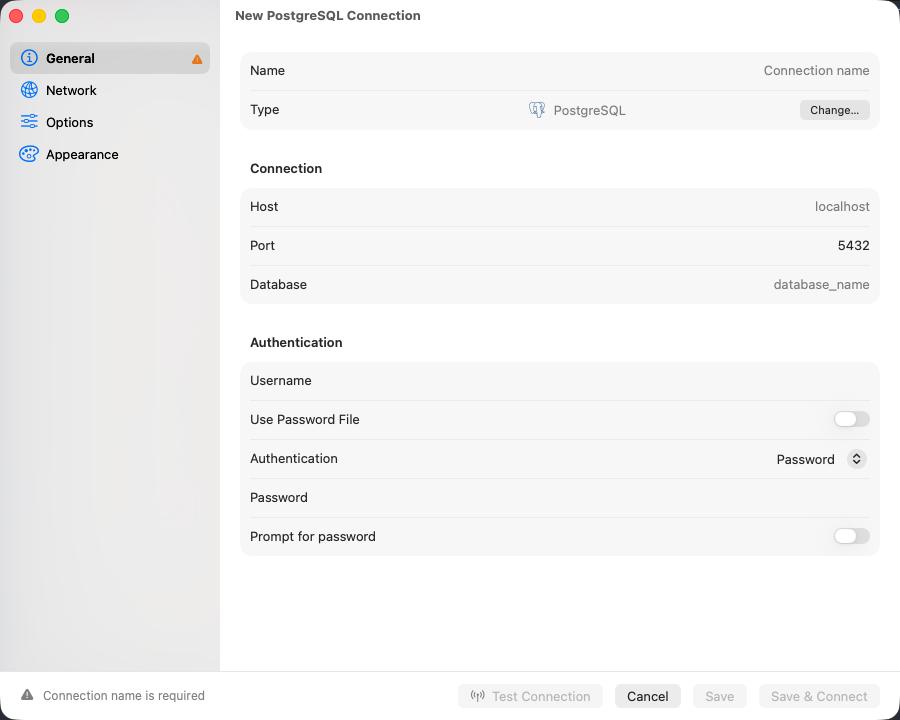
Unlike MySQL, PostgreSQL will not connect without a **Database**, and it changes database only by reconnecting. Everything else on the form is ordinary. The libpq driver ships inside the app and also serves [Amazon Redshift](/databases/redshift), [CockroachDB](/databases/cockroachdb), and [PGlite](/databases/pglite).
## Connection settings
| Field | Default | Notes |
| ------------ | ----------- | ------------------------------------------- |
| **Host** | `localhost` | |
| **Port** | `5432` | |
| **Username** | - | Not pre-filled; most servers use `postgres` |
| **Database** | - | **Required** |
Fill in the form and click **Save & Connect**. For remote servers use [SSH tunneling](/connections/ssh-tunneling); Google Cloud SQL instances can connect through the [Cloud SQL Auth Proxy](/connections/cloud-sql-proxy).
Any server from 9.1 on works. A feature the server predates stays out of the sidebar and the structure editor:
| Feature | Needs |
| ------------------------------------------------------------------ | ----- |
| Materialized views | 9.3 |
| BRIN indexes, the **Bypass row level security** role attribute | 9.5 |
| Declarative partitioning, identity columns, renaming an enum label | 10 |
| Generated columns | 12 |
 ## Connection URL
```text theme={null}
postgresql://user:password@host:5432/database
```
`postgres://` also works. Opening a URL connects directly. See [Connection URL Reference](/connections/urls).
## Authentication
### AWS IAM
Set **Authentication** to an AWS IAM option and set **Username** to a database role granted `rds_iam`. See [AWS IAM Authentication](/connections/aws-iam).
### Password file
Turn on **Use Password File** to read the password from `~/.pgpass` instead of typing one. Entries are `hostname:port:database:username:password`, `*` matches any field, first match wins. The form reports what it found, including `~/.pgpass has incorrect permissions (needs chmod 0600)`, the one that silently blocks a connect.
## Databases and schemas
Every database on the server is listed, `postgres` included; `template0` and `template1` are not. The sidebar shows every schema you have access to, and the toolbar carries the active database and schema side by side: click either to switch, or press `Cmd+K` for the database list.
Right-click a schema to drop it. The statement is `DROP SCHEMA … CASCADE`, so views and functions in *other* schemas that depend on it go too; the confirmation says so before it runs.
A partitioned table is listed once, under its own icon. Expand it for its partitions, and expand a partition again if it is subpartitioned; opening one works like opening any other table. Tables using the older `INHERITS` inheritance are listed normally, each child in its own right.
## Column types
`jsonb` renders as formatted JSON, and `uuid`, `inet`, `timestamp with time zone`, `interval` and `bytea` display natively. PostGIS `geometry` and `geography` render as EWKT with the SRID kept, `SRID=4326;POINT(-73 40.7237)`, rather than raw EWKB hex; a value that fails to convert stays hex.
An array column opens one of two editors, decided by its element type:
| Element type | Editor |
| -------------------------------------------------------------------------------------------------------- | -------------------------------------------- |
| `text[]`, `integer[]`, `numeric[]`, `uuid[]`, `boolean[]`, `timestamptz[]`, enum arrays such as `mood[]` | A list, one row per element |
| `jsonb[]`, `bytea[]`, composite arrays, and any multi-dimensional array | The plain text editor over the `{…}` literal |
In the list editor, reorder rows with the arrows, add and remove elements, and set a single element to NULL; an empty array and a NULL column stay distinct. Enum elements pick from the labels the type declares, and a label the type no longer lists stays selectable and is flagged. **Edit as Text** switches to the raw literal at any time.
## User-defined types
Enums, composites, domains and ranges are listed under **Types** in each schema, the `CREATE` statement rebuilt from `pg_type`. An enum's labels are edited in place with `ALTER TYPE … ADD VALUE` and, from PostgreSQL 10, `RENAME VALUE`; PostgreSQL has no statement that drops or reorders a label. The structure editor's type picker offers the schema's types under **User-Defined**. See [User-Defined Types](/features/user-defined-types).
## Views and comments
A view's definition is rebuilt to run anywhere. Every table it reads is schema-qualified, and `WITH (security_barrier)`, `WITH (security_invoker)` and `WITH CASCADED CHECK OPTION` are written back, so executing the statement elsewhere keeps the restrictions the original carried. Read it with **Show DDL**, copy it with **Copy DDL**, or edit it with **Edit View Definition**. A materialized view's statement carries its access method, storage parameters and tablespace, and the DDL tab adds its indexes.
`REFRESH MATERIALIZED VIEW` runs from **Refresh Materialized View…**. A plain refresh holds an `ACCESS EXCLUSIVE` lock, so nothing reads the view until it finishes. **Refresh concurrently** takes `EXCLUSIVE` instead and leaves readers working, and PostgreSQL accepts it only for a populated view with a valid unique index on plain columns, no `WHERE` clause and no expressions; a partial or expression index does not qualify. The refresh runs on its own connection, outside any transaction a query editor holds open. Refreshing needs ownership of the view, or the `MAINTAIN` privilege from PostgreSQL 17.
**Edit Comment…** writes `COMMENT ON`, picking `TABLE`, `VIEW`, `MATERIALIZED VIEW` or `FOREIGN TABLE` to match the object. Column comments are written from the Columns tab as `COMMENT ON COLUMN`. Clearing the field writes `IS NULL`, which removes the comment. Only the object's owner may comment on it.
## Cross-database tabs
PostgreSQL has no in-place `USE`, so a tab bound to a database other than the connection's active one runs on a second connection opened for that database. It shares no temp tables, session variables, or open transaction with the query editor on the main connection: keep a multi-statement transaction or a `CREATE TEMP TABLE` on tabs bound to one database. Binding itself is on [Tabs](/features/tabs#where-a-tab-points).
## Text encoding
Sessions run in `UTF8` whatever encoding the database was created with, and the server converts text both ways. Japanese in an `EUC_JP` database or accented names in a `LATIN1` one read and save intact, and stay that way after `RESET ALL` or `DISCARD ALL` in a query tab. A `-c client_encoding=…` in **Connection Options** is overridden; other settings there still apply.
## Tools
`EXPLAIN` and `EXPLAIN ANALYZE` run with `FORMAT JSON` and render as a plan diagram or tree. See [EXPLAIN Visualization](/features/explain-visualization). **Database > Users & Roles** shows where each privilege comes from before you grant or revoke it. **Backup Dump** and **Restore Dump** shell out to your local `pg_dump` and `pg_restore`; see [Backup & Restore](/features/backup-restore).
## SSL/TLS
New connections default to **Preferred** (libpq `sslmode=prefer`): TLS first, plain text if the server refuses it. Pick **Verify CA** to validate the server certificate. See [SSL/TLS](/connections/ssl).
## Limitations
* Columns cannot be reordered. The structure editor adds, renames, retypes, and drops; changing the order of existing columns means recreating the table.
* A cross-database tab cannot share session state with the main connection. Statements that depend on a temp table or an open transaction have to run on one database.
* Backup and restore need `pg_dump` and `pg_restore` on your Mac. Neither is bundled; install them with Homebrew. `pg_dump` 15 and later refuse PostgreSQL 9.1, so back one up with `pg_dump` 14 or earlier.
* Before PostgreSQL 12, the [`run_maintenance`](/external-api/mcp-tools) tool's `REINDEX` with no `table` runs without `CONCURRENTLY` and rebuilds the system catalog indexes as well. While an index rebuilds, writes to its table wait, and so do reads that use that index. Run it when the database is quiet.
## Troubleshooting
**Connection refused**: check the server is running, that `listen_addresses` in `postgresql.conf` covers remote connections, and that the firewall allows port 5432.
**FATAL: password authentication failed for user "…"**: the role and password are checked against `pg_hba.conf`. Confirm the method on the matching line (`scram-sha-256` or `md5` for passwords, `trust` for local dev), and that the line matches the host you are connecting from.
**ERROR: invalid byte sequence for encoding "UTF8": 0x…**: the database's encoding is `SQL_ASCII`, which stores bytes without checking them, and a value in the result is not UTF-8. Run `SHOW server_encoding` to confirm. Move the data to a `UTF8` database: dump it with `pg_dump --encoding=` and the encoding the text was written in, such as `EUC_JP` or `WIN1252`, then restore that dump into a database created with `ENCODING 'UTF8'`.
**A Postgres-compatible engine loads no tables**: wire-compatible engines connect under the PostgreSQL type, and the catalogs they omit are probed for rather than assumed. An engine without `pg_matviews` still lists its tables; object kinds it does not expose will not appear at all.
## Connection URL
```text theme={null}
postgresql://user:password@host:5432/database
```
`postgres://` also works. Opening a URL connects directly. See [Connection URL Reference](/connections/urls).
## Authentication
### AWS IAM
Set **Authentication** to an AWS IAM option and set **Username** to a database role granted `rds_iam`. See [AWS IAM Authentication](/connections/aws-iam).
### Password file
Turn on **Use Password File** to read the password from `~/.pgpass` instead of typing one. Entries are `hostname:port:database:username:password`, `*` matches any field, first match wins. The form reports what it found, including `~/.pgpass has incorrect permissions (needs chmod 0600)`, the one that silently blocks a connect.
## Databases and schemas
Every database on the server is listed, `postgres` included; `template0` and `template1` are not. The sidebar shows every schema you have access to, and the toolbar carries the active database and schema side by side: click either to switch, or press `Cmd+K` for the database list.
Right-click a schema to drop it. The statement is `DROP SCHEMA … CASCADE`, so views and functions in *other* schemas that depend on it go too; the confirmation says so before it runs.
A partitioned table is listed once, under its own icon. Expand it for its partitions, and expand a partition again if it is subpartitioned; opening one works like opening any other table. Tables using the older `INHERITS` inheritance are listed normally, each child in its own right.
## Column types
`jsonb` renders as formatted JSON, and `uuid`, `inet`, `timestamp with time zone`, `interval` and `bytea` display natively. PostGIS `geometry` and `geography` render as EWKT with the SRID kept, `SRID=4326;POINT(-73 40.7237)`, rather than raw EWKB hex; a value that fails to convert stays hex.
An array column opens one of two editors, decided by its element type:
| Element type | Editor |
| -------------------------------------------------------------------------------------------------------- | -------------------------------------------- |
| `text[]`, `integer[]`, `numeric[]`, `uuid[]`, `boolean[]`, `timestamptz[]`, enum arrays such as `mood[]` | A list, one row per element |
| `jsonb[]`, `bytea[]`, composite arrays, and any multi-dimensional array | The plain text editor over the `{…}` literal |
In the list editor, reorder rows with the arrows, add and remove elements, and set a single element to NULL; an empty array and a NULL column stay distinct. Enum elements pick from the labels the type declares, and a label the type no longer lists stays selectable and is flagged. **Edit as Text** switches to the raw literal at any time.
## User-defined types
Enums, composites, domains and ranges are listed under **Types** in each schema, the `CREATE` statement rebuilt from `pg_type`. An enum's labels are edited in place with `ALTER TYPE … ADD VALUE` and, from PostgreSQL 10, `RENAME VALUE`; PostgreSQL has no statement that drops or reorders a label. The structure editor's type picker offers the schema's types under **User-Defined**. See [User-Defined Types](/features/user-defined-types).
## Views and comments
A view's definition is rebuilt to run anywhere. Every table it reads is schema-qualified, and `WITH (security_barrier)`, `WITH (security_invoker)` and `WITH CASCADED CHECK OPTION` are written back, so executing the statement elsewhere keeps the restrictions the original carried. Read it with **Show DDL**, copy it with **Copy DDL**, or edit it with **Edit View Definition**. A materialized view's statement carries its access method, storage parameters and tablespace, and the DDL tab adds its indexes.
`REFRESH MATERIALIZED VIEW` runs from **Refresh Materialized View…**. A plain refresh holds an `ACCESS EXCLUSIVE` lock, so nothing reads the view until it finishes. **Refresh concurrently** takes `EXCLUSIVE` instead and leaves readers working, and PostgreSQL accepts it only for a populated view with a valid unique index on plain columns, no `WHERE` clause and no expressions; a partial or expression index does not qualify. The refresh runs on its own connection, outside any transaction a query editor holds open. Refreshing needs ownership of the view, or the `MAINTAIN` privilege from PostgreSQL 17.
**Edit Comment…** writes `COMMENT ON`, picking `TABLE`, `VIEW`, `MATERIALIZED VIEW` or `FOREIGN TABLE` to match the object. Column comments are written from the Columns tab as `COMMENT ON COLUMN`. Clearing the field writes `IS NULL`, which removes the comment. Only the object's owner may comment on it.
## Cross-database tabs
PostgreSQL has no in-place `USE`, so a tab bound to a database other than the connection's active one runs on a second connection opened for that database. It shares no temp tables, session variables, or open transaction with the query editor on the main connection: keep a multi-statement transaction or a `CREATE TEMP TABLE` on tabs bound to one database. Binding itself is on [Tabs](/features/tabs#where-a-tab-points).
## Text encoding
Sessions run in `UTF8` whatever encoding the database was created with, and the server converts text both ways. Japanese in an `EUC_JP` database or accented names in a `LATIN1` one read and save intact, and stay that way after `RESET ALL` or `DISCARD ALL` in a query tab. A `-c client_encoding=…` in **Connection Options** is overridden; other settings there still apply.
## Tools
`EXPLAIN` and `EXPLAIN ANALYZE` run with `FORMAT JSON` and render as a plan diagram or tree. See [EXPLAIN Visualization](/features/explain-visualization). **Database > Users & Roles** shows where each privilege comes from before you grant or revoke it. **Backup Dump** and **Restore Dump** shell out to your local `pg_dump` and `pg_restore`; see [Backup & Restore](/features/backup-restore).
## SSL/TLS
New connections default to **Preferred** (libpq `sslmode=prefer`): TLS first, plain text if the server refuses it. Pick **Verify CA** to validate the server certificate. See [SSL/TLS](/connections/ssl).
## Limitations
* Columns cannot be reordered. The structure editor adds, renames, retypes, and drops; changing the order of existing columns means recreating the table.
* A cross-database tab cannot share session state with the main connection. Statements that depend on a temp table or an open transaction have to run on one database.
* Backup and restore need `pg_dump` and `pg_restore` on your Mac. Neither is bundled; install them with Homebrew. `pg_dump` 15 and later refuse PostgreSQL 9.1, so back one up with `pg_dump` 14 or earlier.
* Before PostgreSQL 12, the [`run_maintenance`](/external-api/mcp-tools) tool's `REINDEX` with no `table` runs without `CONCURRENTLY` and rebuilds the system catalog indexes as well. While an index rebuilds, writes to its table wait, and so do reads that use that index. Run it when the database is quiet.
## Troubleshooting
**Connection refused**: check the server is running, that `listen_addresses` in `postgresql.conf` covers remote connections, and that the firewall allows port 5432.
**FATAL: password authentication failed for user "…"**: the role and password are checked against `pg_hba.conf`. Confirm the method on the matching line (`scram-sha-256` or `md5` for passwords, `trust` for local dev), and that the line matches the host you are connecting from.
**ERROR: invalid byte sequence for encoding "UTF8": 0x…**: the database's encoding is `SQL_ASCII`, which stores bytes without checking them, and a value in the result is not UTF-8. Run `SHOW server_encoding` to confirm. Move the data to a `UTF8` database: dump it with `pg_dump --encoding=` and the encoding the text was written in, such as `EUC_JP` or `WIN1252`, then restore that dump into a database created with `ENCODING 'UTF8'`.
**A Postgres-compatible engine loads no tables**: wire-compatible engines connect under the PostgreSQL type, and the catalogs they omit are probed for rather than assumed. An engine without `pg_matviews` still lists its tables; object kinds it does not expose will not appear at all.